01
Ask an agent for an automation
Tell a hired agent what should happen: a support chatbot on your site, triage for incoming email.
Repeatable AI automations: a trigger, AI steps, then your tools. Ask an agent for a support chatbot or email triage and it builds and wires it in.
AI automations is the tool your agents use when a task needs a repeatable workflow. Ask an agent to add a support chatbot or email triage and it builds the workflow, a trigger, AI steps and integrations, and wires it in for your approval. From then on it runs that exact sequence every time the trigger fires: the fixed-sequence counterpart to a hired agent that decides for itself.
Read the documentationTell a hired agent what should happen: a support chatbot on your site, triage for incoming email.
The agent picks the trigger, adds the AI steps and connects your tools, then publishes it for your approval.
Every time the trigger fires, the same sequence runs: a reply via Gmail, an invoice in QuickBooks, a log to your CRM.
Messages, emails, schedules and webhooks. Any of them can start a flow.
Reasoning built in. Not just plumbing.
Google Workspace, Microsoft 365, QuickBooks, and more.
Same flow runs every time, with the same logic.
Workflows run in dedicated secure environments we operate. Nothing to rent, patch, or babysit.
An automation runs a fixed sequence. When the job needs judgement, the hired agent itself decides when to act, asks when a decision is yours, and can run your automations as tools.
Run sensitive workflows in private mode: zero-retention models only, no trace in the run logs. Costs 2.0× list instead of 1.5×.
About private AI mode
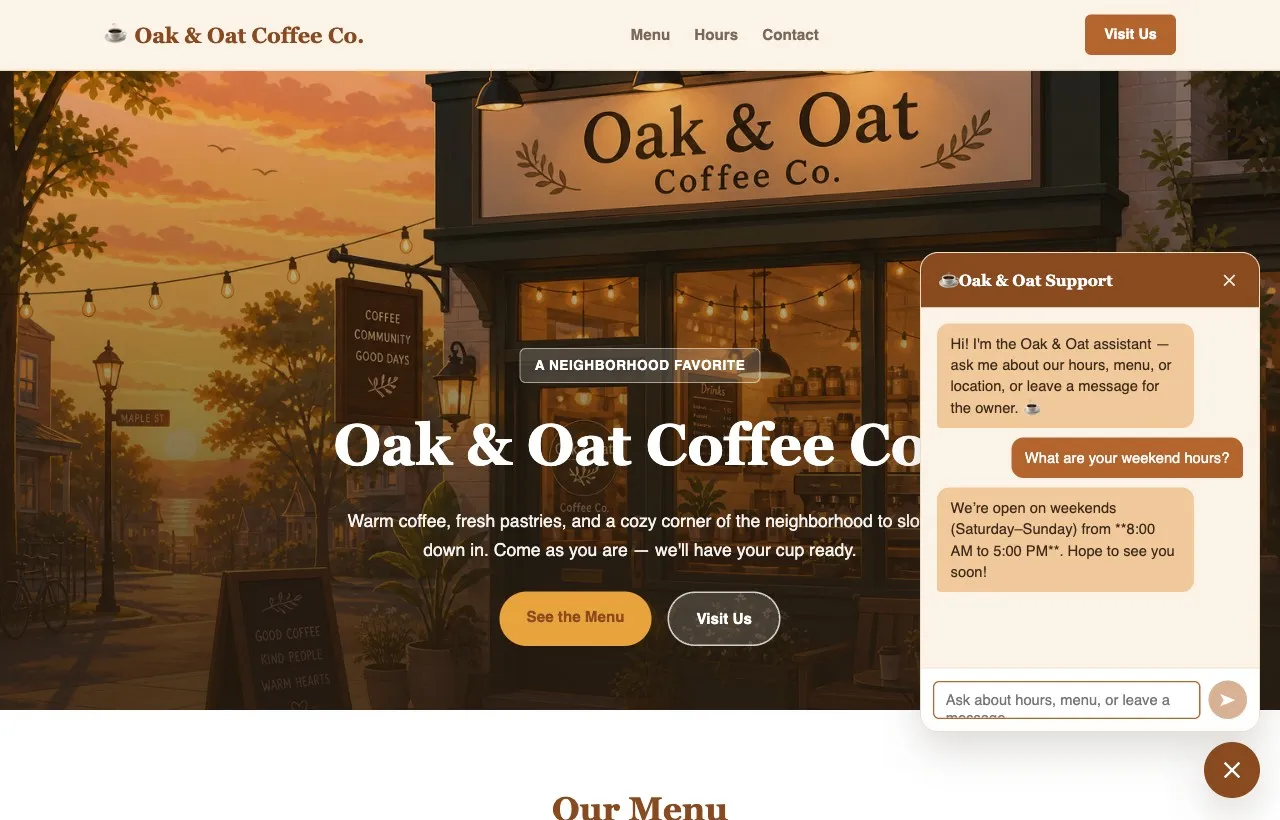
Ask an agent to add a chatbot and it builds an automation that answers hours, menu and location from your content, takes a message for you, and wires itself into your live site.
When a message arrives, an AI step classifies it and drafts or routes a reply.
A new form submission creates an invoice in QuickBooks or a draft in Gmail.
On a schedule, pull data, let AI summarize it, and send the result to your team.
Yes, that is how it works. Ask a hired agent to add an automation, a support chatbot or email triage, and it builds the workflow (trigger, AI steps, integrations) and wires it in for your approval.
A message, an incoming email, a file upload, a schedule or a webhook from another system.
The integrations your org admin enables, including Google Workspace, Microsoft 365, QuickBooks, Xero, Shopify and SendGrid, plus web search and web automation.
No. You describe what should happen in plain language, and ask the agent for changes the same way.
No. Workflows run in dedicated secure environments that Crewdle hosts and operates, included with the harness fee. There is no VPS to rent or maintain, and a workflow that is not running costs nothing.
No subscription. No credit card. Pay only when the AI works. If you're a real business, we'll throw in a 30-minute demo with a human.
