Stop asking AI questions. Give it a job.
Most small businesses do not have an AI problem. They have a Monday problem.
An AI agent is the fix: you give it a job that repeats, and it does the work and keeps the result where you can see it.
On Monday morning you want a few plain answers. Will we make payroll? Which client is waiting on a document? Who has not finished their training? You do not want a chat window and a blank prompt. You want the answer to be there.
That is the gap between asking an AI a question and giving an AI a job.
AI agent vs chatbot: a chat answers, a job gets done
A chat is good for a one-off question. You ask, it replies, the conversation scrolls away. Tomorrow you start again.
A job is different. It repeats, it has a deadline, and it leaves a record. Following up on quotes is a job. Chasing clients for documents is a job. Keeping a cash forecast current is a job.
For a job, the agent needs somewhere to keep its work. A place where you can open it and see where things stand without asking. (If you are still deciding between the two, our agents vs. chat framework helps you score your use case.)
How an AI agent job works: a workspace, not just a prompt
On Crewdle, 32 of the agents come with their own ready-made app. You add the agent, and the app comes with it. The agent runs it and keeps it current. You open it whenever you like.
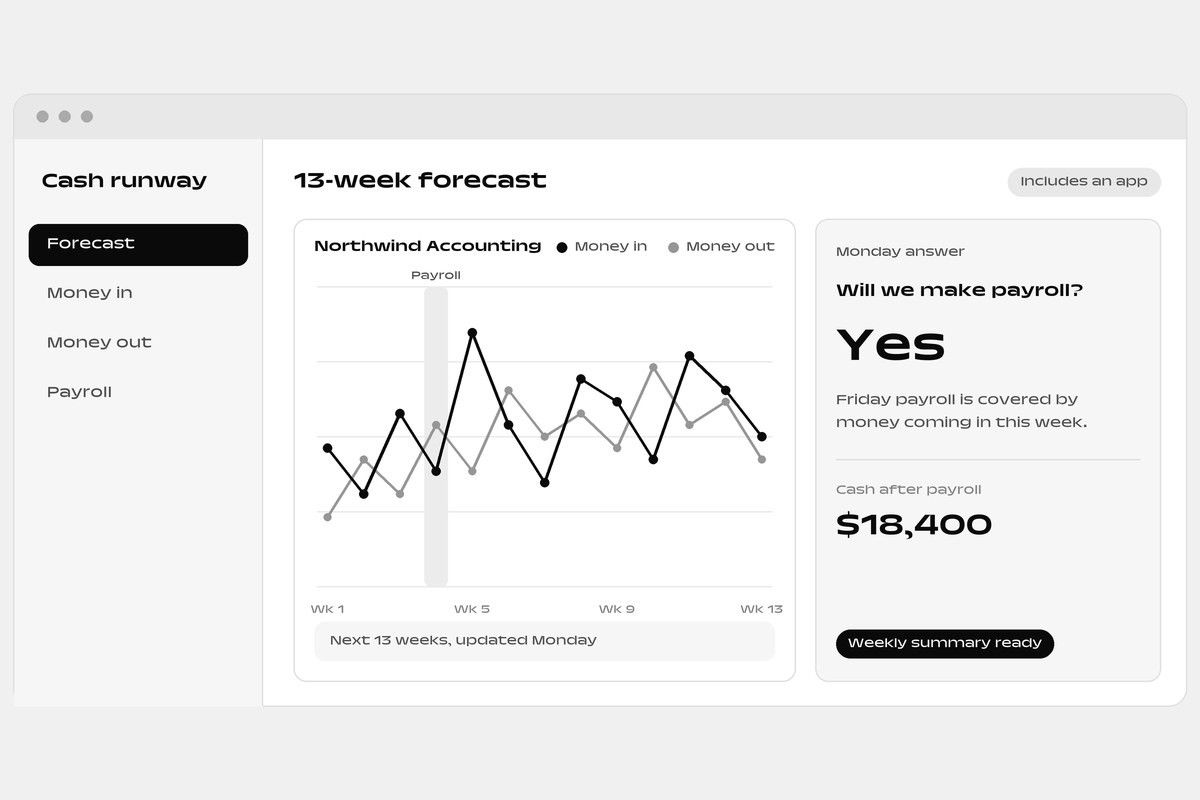
Take the cash forecast. The Cash runway app holds a 13-week view of what comes in and what goes out, kept current from your books. You can test a what-if before you commit to something. And every Monday it gives you a plain answer to the question you actually have: will we make payroll?
You did not write a prompt for that. You did not remember to ask. The work was already done when you sat down.
What jobs can an AI agent do for a small business?
Once you see it for one job, you see it everywhere.
- Client documents. The Client file room shows what each client still owes you. Each request gets a private folder in your drive. Reminders go out only after you approve them, and each file the agent reads is matched to the checklist.
- Tenders and bids. The Bid board puts every tender's deadlines and mandatory items in one checklist. Answers come from your own library, and the agent writes first drafts for you to review.
- Training. The Training app turns your procedures into short lessons with checklists and quizzes, assigns them to your staff, and tells you who is behind.
- Time and profit. Time & profit gives your team timers and timesheets, gets hours ready to invoice, and sends a plain-language note each week on which clients actually make you money.
Each of these is a role you add. Client Document Collector, Bid & Tender Manager and Client Profit Check are new. Financial Analyst and Learning & Development Specialist now come with an app too. In all, there are 78 roles to choose from.
Stay in control of your AI agent
An agent that works on its own needs limits you can see. On Crewdle, sensitive actions wait for your approval. You can set a monthly budget, in dollars. You can switch on AI guardrails, which check messages and replies against your policies, and you can watch for violations first or block them.
The reminders in the file room are a good example. The agent prepares them. You decide whether they go.
Where the agent meets your tools
A workspace is only useful if it connects to the rest of your day. Crewdle has 44 integrations your admin can switch on, including Miro, where an agent can read your boards and add sticky notes. Your agents work in the tools you already use, and the app is where the result lands.
FAQ: AI agents for small business
What is an AI agent, and how is it different from a chatbot? A chatbot answers a question and the conversation ends. An AI agent takes on a job that repeats, does the work, and keeps the result in an app you can open.
What jobs can an AI agent do for a small business? Keeping a cash forecast current, collecting client documents, preparing tender checklists, assigning training, and tracking time and profit by client. There are 78 roles to choose from.
Can I choose where my data lives? Yes. You choose the region when you create your organization: Canada (the default), the United States or Europe.
How much does it cost? You start with $10 in your balance, no card needed. You pay per task, with no subscription.
Can I stay in control of what the agent does? Yes. Sensitive actions wait for your approval, you set a monthly budget in dollars, and AI guardrails check messages and replies against your policies.
How to start with an AI agent
Do not start with the whole business. Pick the one Monday question that costs you the most time.
- Name the question. Is it cash, documents, bids, training or time?
- Find the role that fits. The ready-made apps page lists each one.
- Add the agent and open its app.
- Check what it keeps, and approve what it proposes.
- Add a second job only when the first one is quiet.
You pay from a dollar balance, so you can see what a job costs before you scale it.
The point of an AI agent is not a better chat. It is a Monday morning where the answers are already waiting.
Open the Cash runway app, or browse the ready-made apps, and try it free. You start with $10 in your balance, no card needed. You pay per task, with no subscription.
 Ask about this article