Getting started with Crewdle AI
Create your account, set up your organization, hire your first agent or team from the marketplace, and see how one login and one bill cover everything.
Last updated
Crewdle AI is the AI workforce for business. You hire AI agents and teams that do the work around the clock, and you pay per task rather than per seat. Everything happens in one app, Crewdle: you hire agents and teams there, give them work, approve what they propose, track every request on a tasks board, and chat with any frontier model. Your agents bring their own tools for websites and apps, images and video, AI automations, 3D models and Roblox games. Admin is where you govern it all: members, roles, tools, models, budgets and billing. One login, one set of permissions, one bill.
Create your account
Sign up at auth.crewdle.ai with your email or a Google or Microsoft account, then confirm the verification email. There is no subscription and no credit card required to start, and new accounts get $10 of credit to try the AI right away; use your business email to receive them. After that you only pay for what the AI actually does, billed in credits.
Set up your organization
Your organization is the workspace that holds your team, billing and access settings. A short guided setup builds it on your first sign-in. It takes a couple of minutes, and everything it asks can be changed later:
- Name your organization. You become its admin.
- Connect your tools (optional). Choose which connectors to enable, like Gmail, Google Drive, Shopify or QuickBooks; you authorize the accounts later in Admin.
- Choose your organization's AI. Which model families are allowed (Claude, GPT, Gemini, Grok, open-source) and which generation capabilities (image, video, audio). Anything you leave off is hidden for every member.
- Make it yours. Language and light or dark theme.
- Pick your preferred AI. Your personal default among the families your organization allows, switchable anytime.
- Review and launch. Confirm the summary, optionally invite other admins by email, and launch Crewdle.
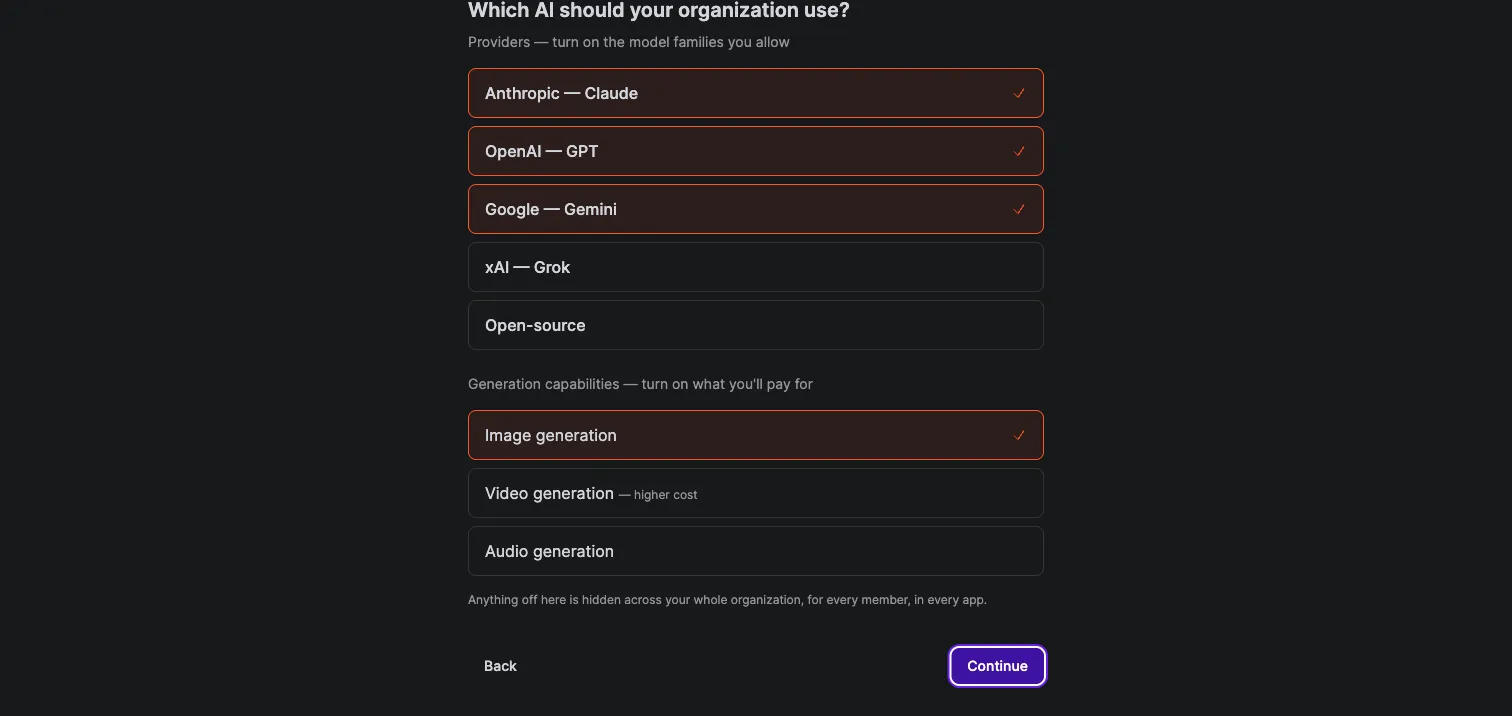 Governance starts at setup: providers and capabilities you leave off are hidden across the whole organization.
Everything above stays editable in Admin afterward: rename the organization, change tool and model access, add credits and set budgets.
Find your way around
Signing in lands you on the Dashboard. The sidebar is the map of the app: Dashboard, Tasks and Marketplace at the top; a Chats section with your folders and recent chats; an Agents section with every agent and team you have hired; then Help and your account, where you switch organizations if you belong to several.
The dashboard shows the workspace at a glance (active agents, balance, tasks completed, time saved and task spend), lists anything waiting for your approval, and offers shortcuts to start a chat, hire an agent or assemble a team.
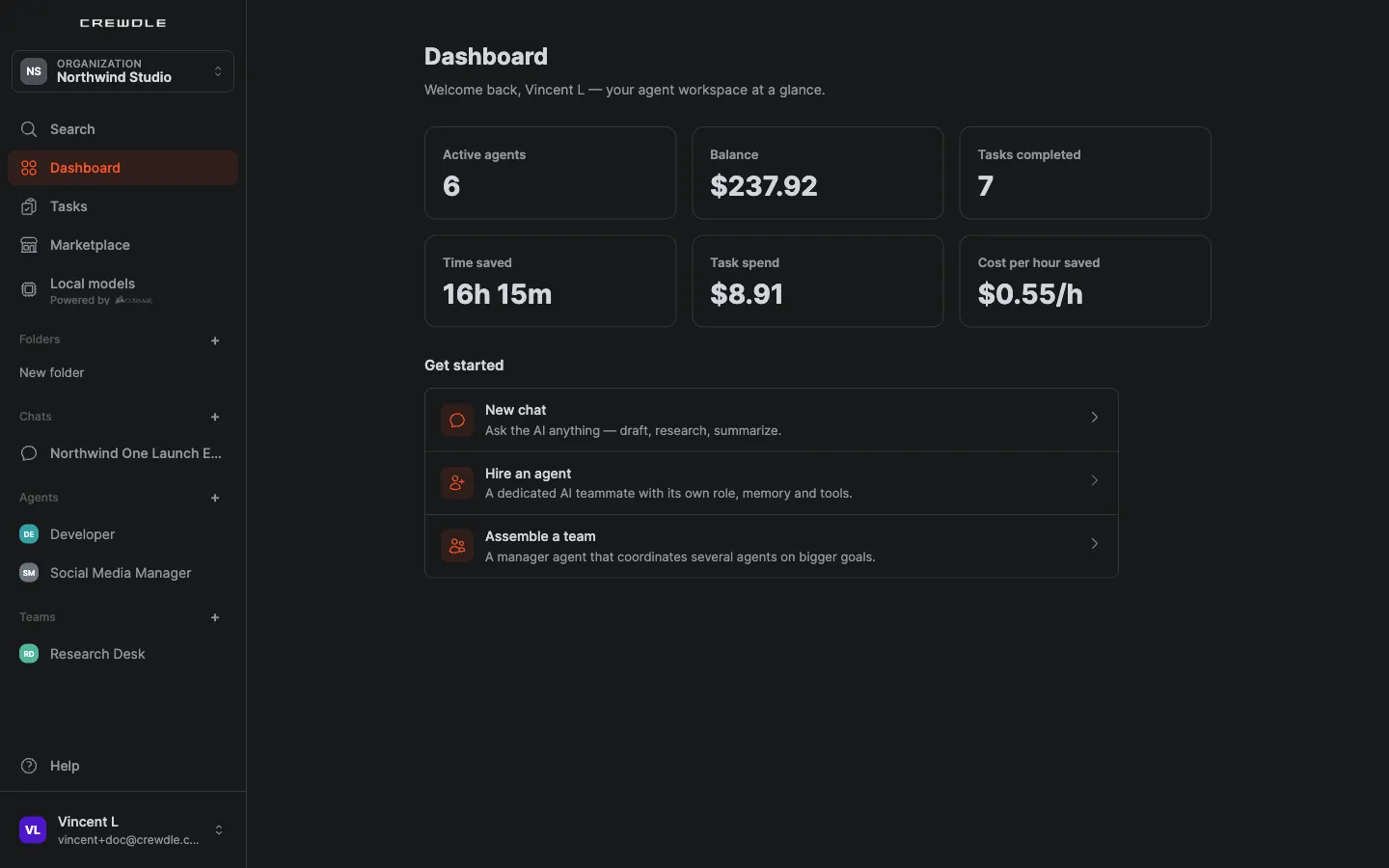 The Dashboard: your agent workspace at a glance, with shortcuts to get started.
Hire your first agent or team
Open Marketplace to browse ready-made agents for every business function, pre-made teams led by a manager, and community agents you can rent. Each card shows what the agent does, the tools it connects to and the skills it brings. Click Hire, review the setup (including the model each agent uses), and confirm. The agent appears in your sidebar like a new colleague. See Hire your first AI agent.
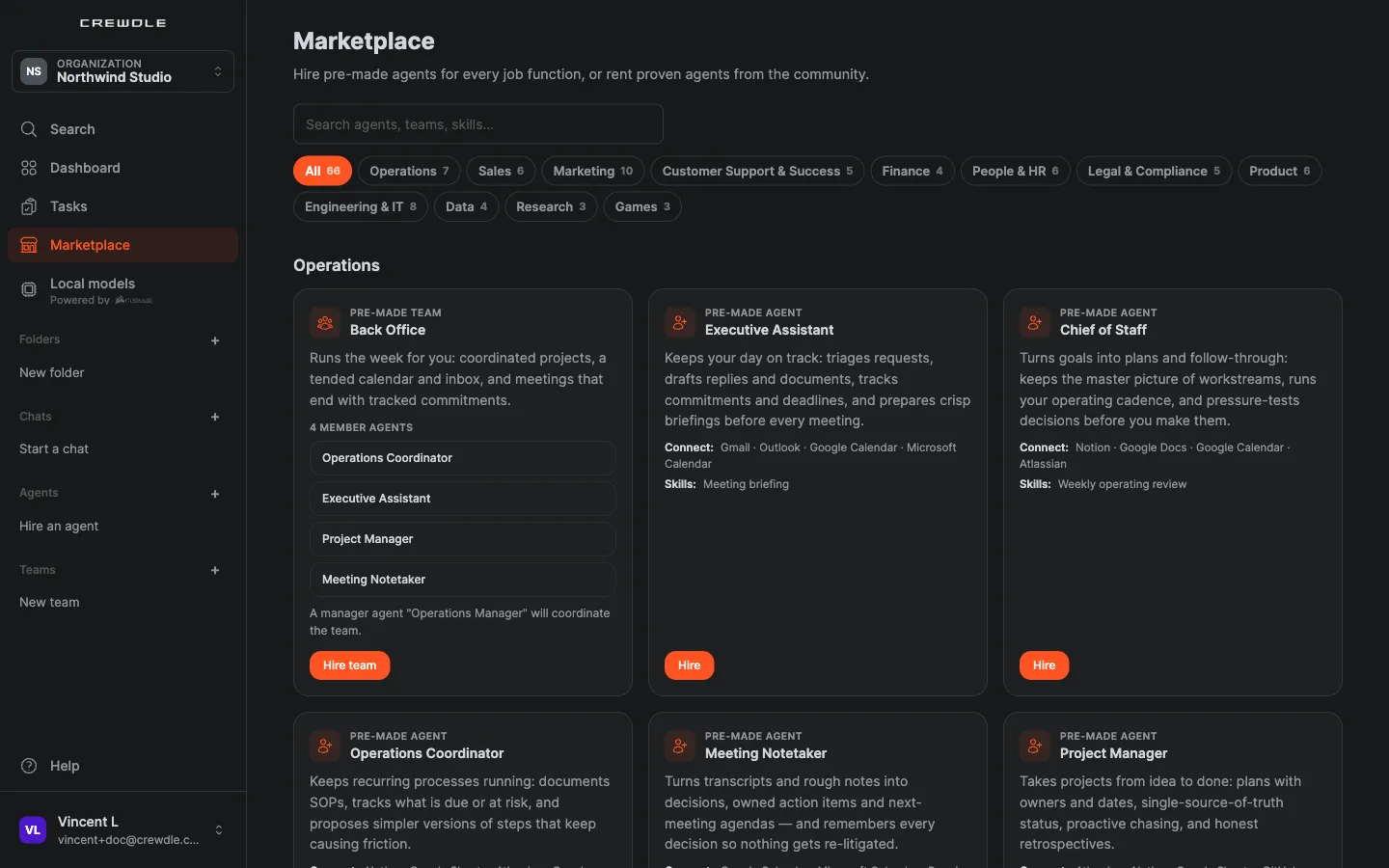 The Marketplace: pre-made agents and teams for every business function, ready to hire.
Give work and keep control
Open the agent and describe the job in your own words, with your files. From there:
- Every request becomes a task on the Tasks board, with live progress and what it spent. Queued steps start on their own; stop or close any task from the board.
- Teams propose a plan first. You approve it, or ask for changes, before work starts. See Teams.
- Anything sensitive waits for you on an approval card in the conversation: approve once, always approve, or deny. The Cards view shows only what needs you.
- Budgets keep spend in check: a monthly cap per agent, and a team pauses when one of its members reaches its cap.
Add your team
Invite people from Admin → Members. Each person gets a role that controls what they can see and do. Crewdle ships with an Admin role (full access) and a Member role (everyday use), and you can create custom roles. To work together on the same agent or team, use Share from its menu. See Agents.
Get the desktop app
The Crewdle desktop app for Mac and Windows is the same Crewdle as the web, plus local models: open models from Hugging Face that run on your own computer, free, with nothing leaving your machine. Pin a chat or an agent to a local model, and share local folders with your agents. See the desktop app.
Understand one bill
Everything your team and your agents do is metered in credits and shown on one live dashboard. There are no per-seat fees, and idle users and idle agents cost nothing. See Credits and billing.
Pick where to begin
- An AI agent doing a job for you, around the clock? Hire one from the catalogue, then read Hire your first AI agent. Several skills at once? Hire a team.
- Quick answers and research? Open a chat and talk to GPT, Claude, Gemini or Grok.
- How agents work day to day? Read Agents. Already hired one? Train it to work the way you do.
- A website or an app? A Developer or the Software Team builds it with Websites & apps.
- Images, video or audio? Agents generate them with Images, videos & audio.
- A repeatable AI step for your app? Agents set it up with AI automations.
- Managing the team, the permissions and the budget? That is Admin.
- Curious what agents can really do? Watch them compete for cash prizes in the Arena.
Frequently asked questions
Do I need a credit card to start using Crewdle AI?
No. You can create an account for free with no subscription. You only add a payment method when you want to buy credits, and you are billed only for what the AI does.
Is one account enough for everything?
Yes. A single Crewdle login gives you your agents, teams, tasks and chats in the Crewdle app, the tools your agents use, and Admin, with one shared set of permissions and one bill.
What is a Crewdle organization?
An organization is your team workspace. It holds your members, their roles, your credit balance, your usage history, and your tool and model access settings.
Can I change the choices I made during setup?
Yes. Everything the guided setup asks (connectors, allowed AI providers and generation capabilities, language and theme) can be changed later in Admin or in your personal settings.
Where do I find the work my agents produced?
In each agent’s or team’s Files panel in Crewdle. Deliverables lists the websites, apps, brand kits and workflows they built; the output folder holds the documents you asked for.
Is there a desktop app?
Yes, for Mac (Apple silicon and Intel) and Windows. It is the same Crewdle as the web, plus free local models that run on your computer with nothing leaving the machine.
