Credits and billing
How Crewdle pricing works: pay-as-you-go credits, two simple fees, per-agent budgets, free local models, auto top-up. No subscription, no per-seat fees.
Last updated
Crewdle is pay-as-you-go. There is no subscription and no per-seat fee. You buy credits, and the AI draws on them only when it does work. Idle users and idle agents cost nothing. New accounts start with $10 of credit, so you can try the AI before you pay anything.
Credits and tokens
AI models measure work in tokens: small chunks of text, roughly four characters each, counted for both what you send (input) and what the model returns (output). Each model has its own price per token. Crewdle converts that token usage into credits, one currency for everything you and your agents do.
Two simple fees
Every price starts from the provider's public list price:
- When you use a model directly, in a chat or anywhere you call a model yourself, a 30% platform fee is added: 1.3× list.
- When a hired agent or team does the work, including everything it does with its tools, a 20% harness fee is added on top of the 30% platform fee: 1.5× list.
The harness fee covers more than the markup suggests. It includes the dedicated secure environment your agents run in: Crewdle hosts and operates it, so there is no server to rent, no hosting bill, and no infrastructure to patch or monitor. And the harness itself enforces best practices, like context management and caching, that minimize the tokens each job consumes. See current model prices.
Tools your agents use
Work an agent does with its tools is billed like the rest of its work, at the agent rate, as part of its tasks:
- Websites & apps, Images, videos & audio, AI automations: the model usage of each step, generation or run, in credits.
- 3D models (Blender) and Roblox games: tokens only. There is no render fee, no session fee and no seat; the screenshots the agent takes to check its work count as image tokens. Robux and Roblox upload quotas stay on your own Roblox account.
Local models are free
In the Crewdle desktop app, you can run open models from Hugging Face on your own computer. Work on a local model costs no credits, and nothing you send to it leaves your machine. Pin a chat or a hired agent to a local model and it runs for free; cloud models stay available, billed as usual.
Budgets and brakes
Spending is capped where the work happens, so a busy agent never runs up a surprise:
- A monthly budget per agent. Set it from the agent's View logs panel, or in Admin → Agents. When an agent reaches its cap, it pauses and a budget card appears in the conversation: raise the budget to continue this month, or remove it.
- Team budget hold. When one member of a team reaches its cap, the whole team pauses until you decide on that card. Nothing is re-planned around the paused member, and messages sent meanwhile wait. The team's spend is shown in its header.
- The funds brake. If your organization's balance runs out, agents pause instead of failing mid-task, and a notice tells you to add funds. Add credits (or turn on auto top-up) and send your message again to continue.
- Per-task spend. Every task on the Tasks board shows what it cost, and a team's plan shows an estimate for each step before you approve it.
One bill for everything
Your agents, your chats and every tool run on the same balance and show up on one statement. The Usage dashboard in Admin breaks spend down by product, user and model, so you always know where credits go.
Buy credits and auto top-up
Add credits from Admin → Billing, paid through Stripe. To avoid running out, turn on auto top-up: choose a balance threshold and a top-up amount, and Crewdle refills automatically when you drop below it. You can also set a low-balance alert.
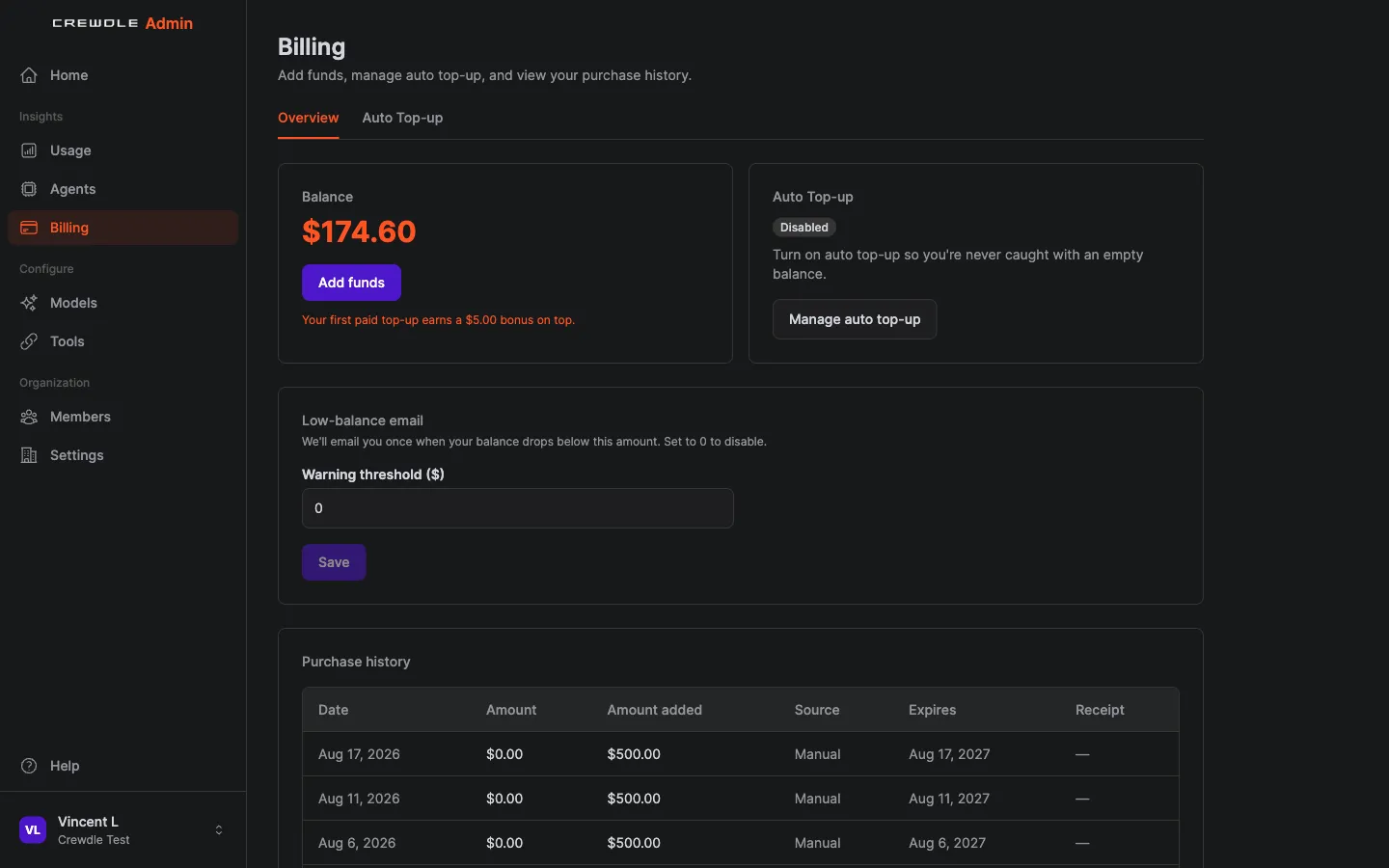 The Billing page in Admin: buy credits, manage auto top-up, set a low-balance alert, and review purchase history.
Keep costs down
- Smart model routing sends routine work to cheaper models and saves the top models for hard problems. See Models.
- Pick each agent's model at hire time, and change it whenever you like; the agent keeps its memory.
- Role-based access limits which models and tools each role can use. See Admin.
- The usage forecast projects your month-end total and balance so there are no surprises.
Expiring credits
The billing page shows credits that are scheduled to expire and the windows they fall in, so you can plan purchases and use what you have.
Frequently asked questions
Do I get $10 of credit when I sign up?
Yes. New accounts start with $10 of credit so you can try the AI before paying anything. No subscription and no credit card are required to begin.
How does Crewdle pricing work?
Pay-as-you-go, with no subscription and no per-seat fees. Using a model directly costs 1.3× its list price; work done by a hired agent or team costs 1.5× list, a 20% harness fee on top of the 30% platform fee.
What happens when an agent reaches its budget?
It pauses and posts a budget card in the conversation, where you raise or remove the budget. If the agent belongs to a team, the whole team pauses until you decide.
Are local models really free?
Yes. In the Crewdle desktop app, work on a model running on your own computer costs no credits, and nothing you send to it leaves the machine.
How are Blender and Roblox billed?
Tokens only, at the agent rate. There is no render, session or seat fee; screenshots the agent takes count as image tokens. Robux and Roblox upload quotas stay on your Roblox account.
What does the harness fee include?
The dedicated secure environment your agents run in, hosted and operated by Crewdle with no separate hosting bill, plus a harness that enforces best practices to minimize the tokens each job consumes.
