Security and privacy
How Crewdle protects your data: stored in the region you choose, never used for training, role-based access, Microsoft sign-in, approvals, a vault agents can’t read, and sandboxes.
Last updated
Crewdle is built for businesses, so control over your data, over who can reach it, and over what agents may do with it is a first-class concern.
Your data is yours
Your conversations, documents and content are never used to train AI models. You bring data in to get work done, and it stays yours. It is stored in the region you choose when you create your organization: Canada by default, or the United States or Europe. See Data residency. On the desktop app, work on a local model never leaves your computer at all.
Access is controlled by role
Every member has a role that defines what they can see and do. You decide who can manage billing, who can change models and tools, who can hire agents and create teams, and which models and tools each role can reach. See Admin.
Secure sign-in
Sign in with email and password, Google, or Microsoft. Connect Microsoft Entra ID in Admin → Organization for enterprise single sign-on with user and role syncing; removing someone from your identity provider removes their access.
Agents ask before they act
Autonomy comes with brakes you set:
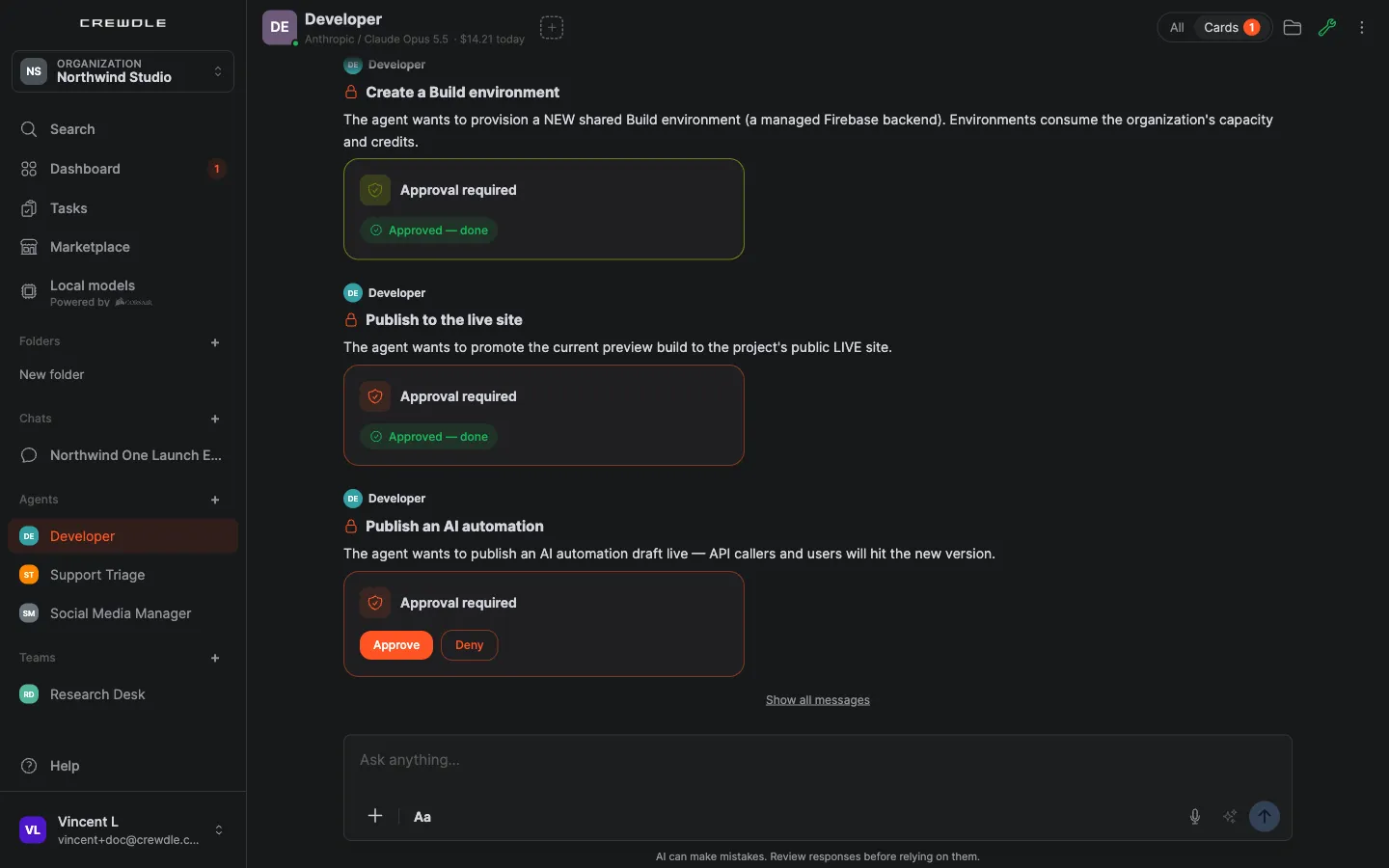
- Approval-gated tools. Sensitive actions, like publishing a website, a Roblox game going live, or an agent saving a change to its own memory or skills, wait on an approval card: Approve, Always approve or Deny.
- Plan approval. A team proposes its plan before work starts, and nothing begins until you approve it.
- Scoped connectors. Each connector exposes individual actions you can switch off, for example read email but never send it.
- Budgets. A monthly cap per agent; a team pauses when one of its members reaches its cap; agents pause rather than fail when the balance runs out.
- A full log. Every agent request is recorded turn by turn, with what it did and spent.
A vault agents can use but never read
Each team, or each solo agent, has a secrets vault for logins and API keys. Values are saved encrypted, can never be viewed again (to change one, remove it and add it again), and each one only works on the website you name. Agents refer to a secret by a placeholder such as {{secret:shop.password}}; Crewdle substitutes the real value on its servers when the request goes out, so the value never reaches the agent or the model. That includes typing a password into a website during a browser session. When an agent needs a credential it doesn't have, it asks on a card, and when an app needs a sign-in provider, you enter the provider's details on a secure card the agent never sees.
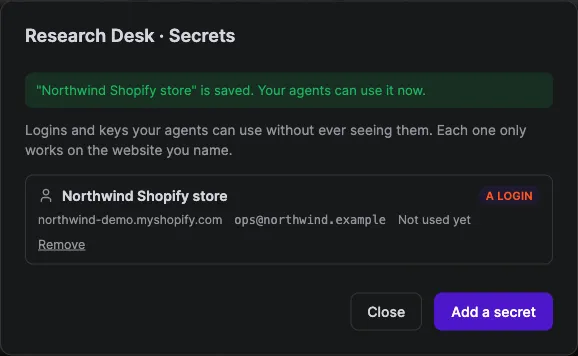
Keys for platforms like Roblox (your Open Cloud API key) are stored encrypted on Crewdle's servers and never given to the agent.
Work runs in sandboxes
- Agents run in a dedicated environment Crewdle operates, isolated per agent.
- Micro-apps an agent builds open in a sandbox isolated from the rest of Crewdle, with a reminder not to enter passwords.
- Blender sessions run sandboxed, with no internet access, and close after 10 minutes idle (autosaved) or 2 hours.
- Roblox publishing goes to your private Test place by default; a live publish needs a clean check, passing tests and your approval each time, and every publish is logged.
- Local folders you share from the desktop app are read-only for agents, and nothing outside them is visible.
Connections you authorize
Integrations connect through secure OAuth or API keys. You grant only the actions you want, you can scope a connection to the whole organization or to a single user, and you can revoke access at any time. See Integrations and connectors.
Private workflows
AI workflows can run in private mode for confidential documents: no run traces are kept, and on OpenAI models the provider is asked not to store the request. See AI automations.
More information
For full legal detail, see the Privacy Policy and Terms.
Frequently asked questions
Does Crewdle use my data to train AI?
No. Your conversations, documents and content are never used to train AI models.
Can an agent see the passwords I store for it?
No. Secrets in the vault are saved encrypted and used through placeholders that Crewdle fills in on its servers, so the value never reaches the agent or the model, even when it types a password into a website.
How do I control who on my team can access what?
Access is role-based. In Admin you assign roles and permissions that decide which models, tools, billing controls and integrations each person can reach, and who can hire agents or create teams.
Does Crewdle support enterprise single sign-on?
Yes. Connect Microsoft Entra ID in Admin → Organization for single sign-on with Microsoft and to sync users and roles from your identity provider.
