AI models and smart routing
The frontier models in Crewdle, choosing each agent’s model at hire, free local models on the desktop app, and how smart routing cuts cost.
Last updated
Crewdle gives you several frontier AI models through one account, with no separate subscriptions or API keys to manage. You can use the best model for each job, and let Crewdle keep the cost in check.
Models available
Across Crewdle and its tools you can reach models from a wide range of providers, including GPT (OpenAI), Claude (Anthropic), Gemini (Google), Grok (xAI), Llama (Meta), and more from Amazon, Cohere, DeepSeek, Mistral, Qwen, and Z.ai, plus specialized models for embeddings, image, video, and music generation, speech-to-text, text-to-speech, real-time speech-to-speech, and web search. The exact list grows over time, and you choose which models your team can use from Admin.
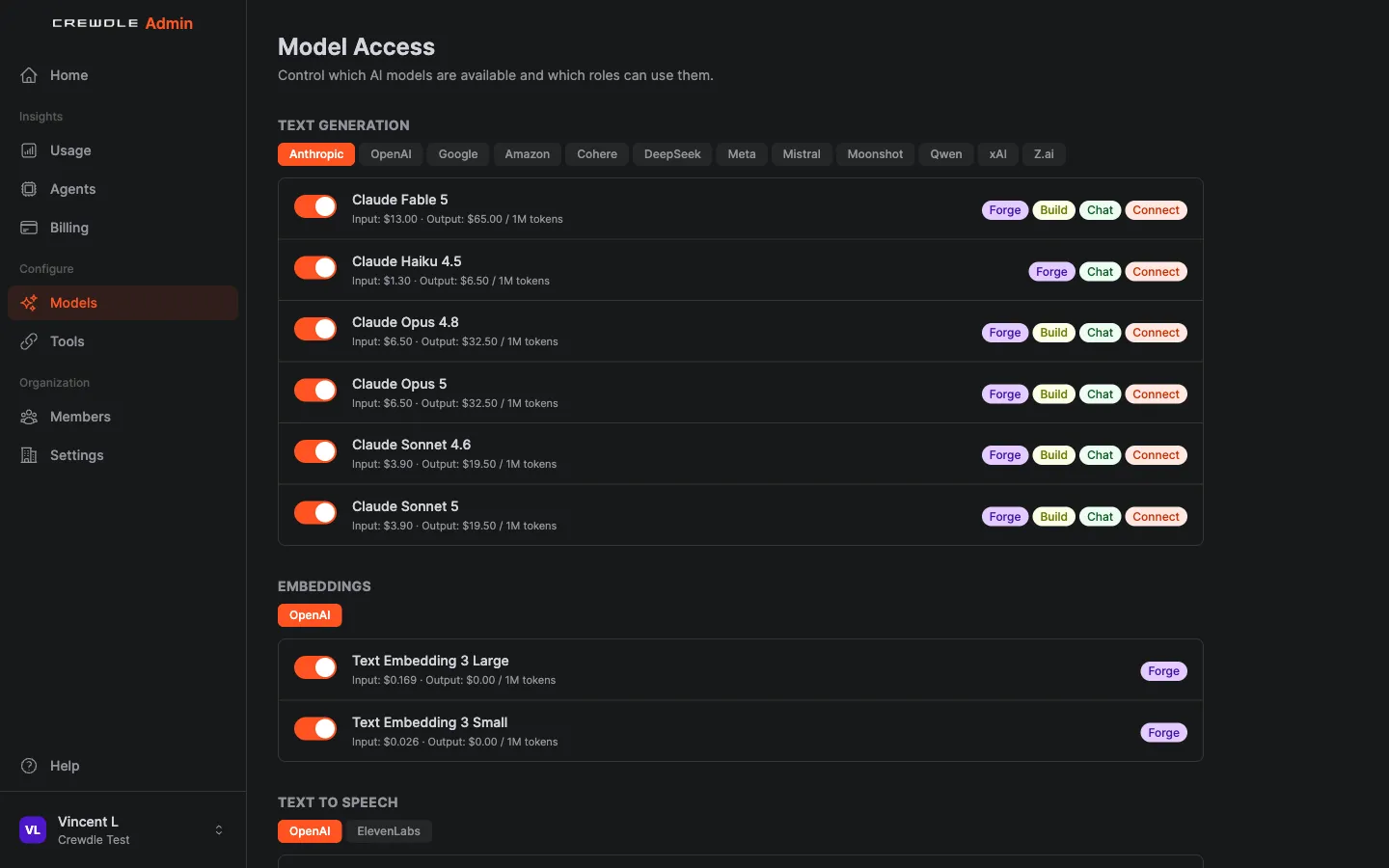 Model Access in Admin: turn models on or off by type, see the credit price per million tokens, and control which apps and roles can use each one.
Picking the right model
- Routine and high-volume work: a smaller, cheaper model is usually fast and good enough.
- Hard reasoning, nuanced writing, or analysis: a top-tier model earns its higher cost.
- Specialized tasks: use a model built for the job, such as an embeddings model for knowledge bases or an image model for visuals.
In Chat you can switch models at any time, even mid-conversation, so it is easy to start cheap and escalate only when needed.
Each agent's model
Every hired agent runs on a model you choose. Marketplace agents default to the latest Claude Opus or Sonnet models, and the hire review shows each agent's model (each member's, for a team) so you can change it before you confirm. Only models your organization allows are offered. Change an agent's model later with Change Model in its options menu: its memory, files and skills live in your workspace, not inside the model, so it keeps everything.
In Admin → Models, you can also opt in to follow new versions, so agents move to a model family's newer version when it is released instead of staying pinned to the old one.
Local models on the desktop app
The Crewdle desktop app for Mac and Windows can download open models in GGUF format from Hugging Face and run them on your own computer, using your GPU (Metal, CUDA or Vulkan). Local models are free: no credits, and nothing you send to them leaves your machine. Pin a chat or a hired agent to a local model; a local agent runs on its schedule while your computer is on, with the same approvals. Check that a model supports tools before giving it to an agent.
Smart routing
Smart routing sends each request to a model that fits the task: cheaper models for routine queries, top models when it counts. This keeps quality where it matters while cutting cost on everything else, and it is one of the main ways Crewdle keeps your bill lower than paying for several premium subscriptions.
In Chat, you can choose a Smart Routing option for Claude, GPT, or Gemini directly from the model picker. Crewdle then routes each message to the right model in that family based on its complexity, so you get the cheaper model on simple asks and the top model on the hard ones without switching by hand.
Your data and models
Whichever model you use, your conversations and content are never used to train AI. See Security and privacy. Where your data is stored, and what model providers process, is on Data residency.
Frequently asked questions
Which AI models can I use in Crewdle?
Crewdle offers frontier models including GPT, Claude, Gemini, Grok and Llama, plus specialized models for embeddings, images, speech and web search, all through one account. The desktop app adds free local models from Hugging Face.
What is smart model routing?
It automatically sends routine requests to cheaper models and harder ones to top models, so you keep quality where it matters while cutting overall cost.
Can I change the model in the middle of a chat?
Yes. In a Crewdle chat you can switch models at any time, including in the middle of a conversation.
