
From Discovery to AI Expert: how Crewdle levels work
The five Crewdle levels, the 16 skills and how each one is earned by a real result. Become an AI expert with Crewdle.
Last updated
Crewdle measures how well you work with AI, not how much you click. Every skill is earned by a real result: an answer you kept, a task an agent finished cleanly, a routine that ran, a plan that completed. Opening a page or pressing a button never counts.
Want the day-by-day version? Read the 30-day plan.
The five levels

| Level | What it means |
|---|---|
| Discovery | You are getting started. |
| User | You get real answers from AI on the first try. |
| Delegator | You hand whole pieces of work to agents. |
| Orchestrator | Your agents use your tools, run on a schedule and work as teams. |
| AI Expert | A meaningful part of your work runs through AI agents, every week. |
The rules
There are 16 skills, 4 per level. A level needs a total number of skills and a minimum number at that level or above. That way an Orchestrator has actually orchestrated, not just collected easy skills.
| To reach | Skills in total | Of which at this level or above |
|---|---|---|
| User | 2 | None required |
| Delegator | 4 | At least 1 Delegator skill (or higher) |
| Orchestrator | 7 | At least 2 Orchestrator skills (or higher) |
| AI Expert | 11 | At least 2 AI Expert skills |
- Your level never goes down. Once a skill is earned, it stays.
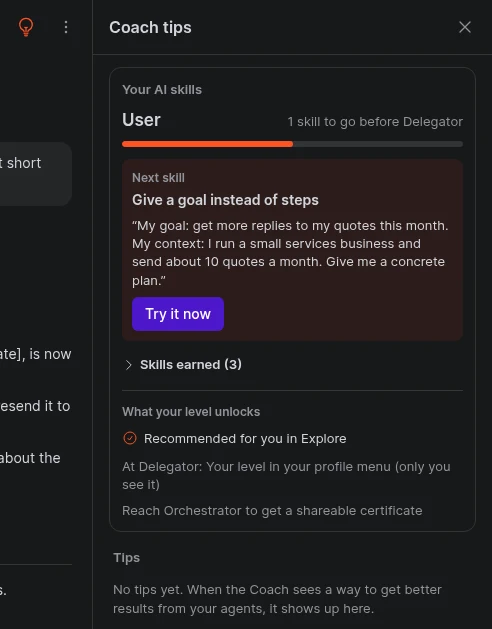
- There is no score. You see your level, a progress bar and how many skills are left.
- Skills update daily. A result you get today shows up within about a day, and Chat tells you in one short line when a skill unlocks.
- Only you see your level, unless you choose to publish your certificate.
Where to see it: in Chat, open the Coach icon (the light bulb at the top right), then Your AI skills. It also shows on Home, in the strip under the greeting, and in the weekly report every Monday.
The 16 skills at a glance
| # | Level | Skill | Earned when |
|---|---|---|---|
| 1 | User | Get a real result | An exchange you carried on without correcting, rephrasing or regenerating, or a task your agent finished. |
| 2 | User | Give a goal instead of steps | 2 requests of 25+ words that got there on the first answer. |
| 3 | User | Work from your own files | A request with a file attached that got there on the first answer. |
| 4 | User | Review and approve cards quickly | 2 cards (approval, plan or question) answered within 24 hours. |
| 5 | Delegator | Send work to an agent from Chat | Work you sent to an agent from Chat came back reported in Chat. |
| 6 | Delegator | Delegate a task end to end | A task done by your agent (or a shared colleague's agent you asked) with no correction while it ran. |
| 7 | Delegator | Add context once in Memory | A memory note you saved was used in a reply. |
| 8 | Delegator | Reuse a template | An agent you added from a template (Explore) finished a task. |
| 9 | Orchestrator | Connect a tool | One of your agents made a successful call to a connected service (Gmail, Drive, Shopify and more). |
| 10 | Orchestrator | Let a routine do it every week | A routine on your agent ran successfully after you set it up. |
| 11 | Orchestrator | Approve a plan and let the team run | A plan card you approved finished: every step done or cancelled, at least one done. |
| 12 | Orchestrator | Delegate every week | 5 clean delegated tasks finished in the last 30 days. |
| 13 | AI Expert | Make several tools work together | Successful calls on 3 different connected services. |
| 14 | AI Expert | A routine you can rely on for a month | A routine set up 28+ days ago that still ran OK in the last 8 days and is not failing. |
| 15 | AI Expert | Run projects through plans | 3 approved plans that finished. |
| 16 | AI Expert | Delegate at scale | 20 clean delegated tasks finished in the last 30 days. |
What a real result means (and what breaks it)
Most skills depend on work that went well the first time. Crewdle looks at the shape of the exchange, never at its text. What counts as clean:
- you got the answer and moved on (or reacted positively);
- the agent finished the task and you did not have to step in while it ran.
What makes an exchange or task not count:
- correcting the answer ("no, I meant...");
- rephrasing the same request;
- pressing regenerate;
- signs of frustration;
- for tasks: stepping in with corrections while it was running, a task closed as stale, or pure bookkeeping tasks.
The single biggest lever: say what you want, why, and what "done" looks like in your first message. Every correction resets the "first time" clock. None of this is a penalty: corrections are normal and you can always fix a result. They just do not prove the skill. The next clean exchange will.
Level 1: User, get real answers
Goal: 2 skills. Most people get there in their first sessions.
- Get a real result. Ask Chat or an agent something you actually need today: a summary, an email draft, a comparison, an answer from your files. Keep the answer and carry on. Do not regenerate "to see another version" unless you need it.
- Give a goal instead of steps. Describe the outcome, not the clicks. "Write an email" is a step. "Write a short, friendly email to our clients announcing that our office is closed December 24 to January 2, that urgent orders can still go through our online store, and that we reopen January 3. Sign as Marie, Customer Service." is a goal: it gives the audience, the content, the tone and the format.
- Work from your own files. Attach the document (PDF, Excel, Word, photos) in the same message as the request, and say what to do with it: "Extract every invoice over $1,000 from this statement into a table with date, supplier and amount."
- Review and approve cards quickly. Agents ask before anything important, through approval, plan and question cards. Answer them the same day. The Decisions icon at the top of Chat and Waiting on you on Home list them all.
Level 2: Delegator, hand work to agents
Goal: 4 skills in total, at least 1 of them a Delegator skill. This is where Crewdle stops being a chatbot and starts doing work for you.
- Send work to an agent from Chat. Ask: "Ask my Marketing agent to prepare three post ideas for next week and report back here." The result comes back into your Chat. That return is what counts. Name the agent or team, and say what you want back.
- Delegate a task end to end. Give an agent a complete job, not a fragment: "Each week I need a one-page sales summary: total orders, top 5 products, and anything unusual compared to last week. Use the Shopify data. Put it in a Word document." Then let it finish. Add new ideas after it delivers, as a new request. An agent that is missing something asks you with a card.
- Add context once in Memory. Put stable facts in Memory once instead of repeating them: company description, products and prices, tone of voice, approval rules, key clients, formats you like. When you catch yourself explaining the same thing twice, tell the agent "remember that...".
- Reuse a template. Open Explore and add an agent or team from a template that matches a real need. Give it its first real task. The skill counts when it finishes one.
Level 3: Orchestrator, tools, routines and teams
Goal: 7 skills in total, at least 2 Orchestrator skills. Your agents now work inside your tools, on a schedule, as a team.
- Connect a tool. Open the agent's Tools and connect a service you really use: Gmail or Outlook, Google Drive or OneDrive and SharePoint, Google Calendar, Shopify, Zoho, Canva, Klaviyo, GitHub. Then give a task that uses it. Choose Read only when you only want the agent to look. Anything that changes or sends always asks you first.
- Let a routine do it every week. Turn a repeated request into a routine: "Every Monday at 8 am, send me a summary of last week's sales and anything that needs my attention." The agent confirms the next run date. Good routines: weekly reports, inbox triage, social media drafts, stock checks, reminders.
- Approve a plan and let the team run. For bigger work, ask a project (a team with a manager) for something with several steps. The manager proposes a plan card with steps and costs. Approve it, then let the team work. If the plan is not right, decline it and say why.
- Delegate every week. About one or two complete tasks a week to your agents, each one left to finish without corrections while it runs.
Level 4: AI Expert, work at scale
Goal: 11 skills in total, at least 2 AI Expert skills. You do not need all 4 AI Expert skills, just 2 plus 9 others.
- Make several tools work together. Connect three services your work crosses, for example Gmail, Google Drive and Shopify, and give tasks that chain them: "When a client emails a purchase order, save the PDF to the Orders folder on Drive and create the order in Zoho."
- A routine you can rely on for a month. Keep at least one routine running for 28+ days without failing. This is the only skill that takes time by design, so start a routine early.
- Run projects through plans. Use projects for any multi-step work: campaigns, a website update, a monthly close, a recruiting round. Three approved plans that finish earn the skill.
- Delegate at scale. About five clean delegated tasks a week, easiest with a mix of routines that create tasks, a project or two, and everyday requests.
Keeping costs under control while you level up
- Plans show the cost per step and the total before you approve.
- Set budgets on agents (and per member, in Admin). The agent stops when it reaches its budget.
- Pick the right model tier: routine work runs well on balanced models; keep premium models for hard reasoning.
- Memory makes requests shorter and cheaper over time.
- Levels never require spending. Skills reward good results, not volume. Your dollar balance pays only for the work your agents do.
Your level, your certificate, your privacy
- Only you see your level. Admins see team totals only, never individual levels, unless you share yours.
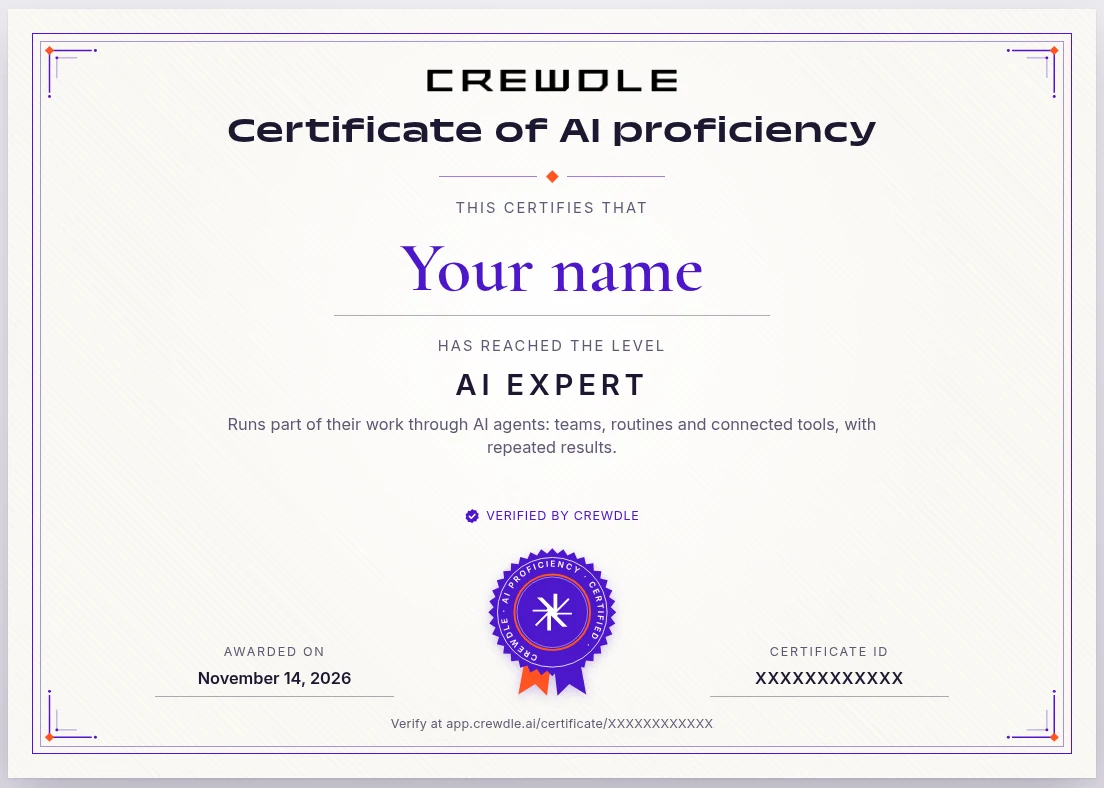
- At Orchestrator and AI Expert, you can publish a certificate. It shows your name, your level, the date and, if you choose, verified stats such as agents run and hours saved. You can add it to your LinkedIn profile or share it. It is off until you publish it, you choose how your name appears, and you can unpublish it at any time.
- The weekly report summarizes your week, your progress and one thing to try. You can turn it off in the Coach settings. Turning off the Coach also hides levels.
Frequently asked questions
Why didn't my skill unlock right away?
Skills are checked about once a day, and some need a finished result (a task, a plan, a routine run). Give it a day.
I corrected the agent. Did I lose progress?
No. Nothing is ever taken away. That exchange just did not prove the skill; the next clean one will.
Does it count if a colleague's shared agent does the work?
Yes, when the task was done because you asked for it.
Can my level go down if I stop using Crewdle?
No. Levels reflect what you have learned, not recent activity. Skills 12 and 16 look at the last 30 days, but once earned they stay.
Do I need all 16 skills?
No. AI Expert needs 11, including 2 AI Expert skills.
Is my data read to compute levels?
Only records like "task finished", "card approved" or "routine ran OK", never the content of your messages or files.
Does my level affect what I can do?
No. Nothing is ever blocked because of a level. For big tasks, Crewdle adds a bit more guidance (a clarifying question, a step-by-step plan with costs) when you are starting out, and gets out of your way as you progress.
